Getting people to visit your vacation rental platform is one thing but getting them to actually complete a booking is another.
Let's say someone is planning a 3 day trip with their family. They already know the location, budget and the type of property they want.
If your platform makes them go through too many properties, shows unavailable dates or hides the final price until checkout, there are higher chances that they might leave
This is why the booking flow matters.
It is not about adding as many features as possible. The features should make it easier for a guest to find a property, check everything they need and complete the booking without unnecessary steps.
Here are seven features I would consider important for that.
1) Advanced search filters
Imagine searching for a villa for six people with a swimming pool, three bedrooms and a budget of $300 per night.
Without filters, you may have to open each and every listing just to find something suitable.
That is not practical, especially when a marketplace has hundreds of properties.
Guests should be able to filter based on things such as,
- Location
- Check-in and check-out dates
- Number of guests
- Price
- Property type
- Bedrooms
- Amenities
- Instant Booking
The filters you provide can depend on the type of marketplace you are building.
A beach rental marketplace may need filters for beach access or water activities. A city apartment platform may care more about parking, public transport or work-friendly spaces. So it depends.
So I would not look at search filters as just another feature on the list.
They are one of the first things that decide how easily a guest can find the right property.
2) Real-time availability
This sounds like a basic feature, but there is a lot happening behind it.
Let's say a guest books a property from Oct 10 to Oct 15.
Once that booking is confirmed, those dates should no longer be available for another guest.
At the same time, the host should also be able to manually block dates when the property is not available.
For example, they may want to use the property themselves for a weekend or temporarily stop taking bookings during maintenance.
If the calendar is not updated properly, you can easily end up with booking conflicts.
So the guest should see the actual availability before going further into the booking process.
If you are a host and managing multiple properties, this is very important.
3) Instant Booking and Request to Book
We added both booking methods in GlyphStay because not every host wants the same level of control.
Some hosts are comfortable allowing guests to book immediately.
Others want to check the guest or booking details first.
With Instant Booking, the guest can reserve the property without waiting for the host to manually approve it.
With Request to Book, the request goes to the host first. The host can then decide whether to accept or decline it.
There is no need to force every host to follow one booking method.
A host managing a frequently booked apartment may prefer Instant Booking, while someone renting out their personal holiday home may want to approve every reservation.
Giving them the choice makes more sense.
4) Guest and host messaging
Not every question can be answered inside a property description right?
A guest might want to ask,
- “Can I check in two hours early?”
- “Is parking available for two cars?”
- “Can I bring my pet?”
- “How far is the property from the airport?”
These are normal questions.
The guest should not have to search for a phone number or move to WhatsApp just to contact the host.
A messaging feature lets both sides have the conversation inside the platform.
It also keeps the previous messages in one place, which can be useful later.
For some bookings, guests may never use messaging.
For others, one simple conversation with the host may be what helps them decide whether to book the property or not.
5) Reviews and ratings
Most of us check reviews before buying something online including me.
Vacation rentals are no different.
A property may have great photos and a good description, but a guest may still want to know what previous visitors experienced.
- Was the place clean?
- Was the location accurate?
- Was the host responsive?
- Was check-in easy?
Reviews can answer things that may not be obvious from the listing itself.
At GlyphStay, we have a 2-way review system, which means it work both ways.
After a completed stay, the guest can review the property or host and the host can review the guest as well.
6) Clear pricing and cancellation policies
This is one area where you should avoid surprises.
If the property is advertised at one price and the amount suddenly changes at checkout, the guest may wonder where the additional cost came from.
A proper price breakdown can show,
- Nightly rate
- Cleaning fee
- Platform service fee
- Discount
- Special-date or seasonal pricing fee
- Taxes, if applicable
- Final amount
For example, a host may normally charge $150 per night but increase the rate during Christmas or another high-demand period.
That price should be reflected clearly before the guest confirms the booking.
Cancellation works the same way.
The guest should know the cancellation rules before paying. It should convey,
- Do they receive a full refund?
- Is there a cut-off date?
- Is the booking non-refundable?
A clear and detailed cancellation policy can help guest to make a decision before booking.
7) Wishlist and saved properties
This is a simple feature but I personally think it is useful.
People rarely choose a vacation property after looking at only one listing.
They may find one property today, another one tomorrow and then compare both before booking.
Without a wishlist, they either have to remember the property name or search for it again.
With a wishlist, they can simply save the listings they like.
Later, they can compare the price, location, reviews, amenities and availability before making a decision.
Nothing complicated here.
It just makes the browsing process easier.
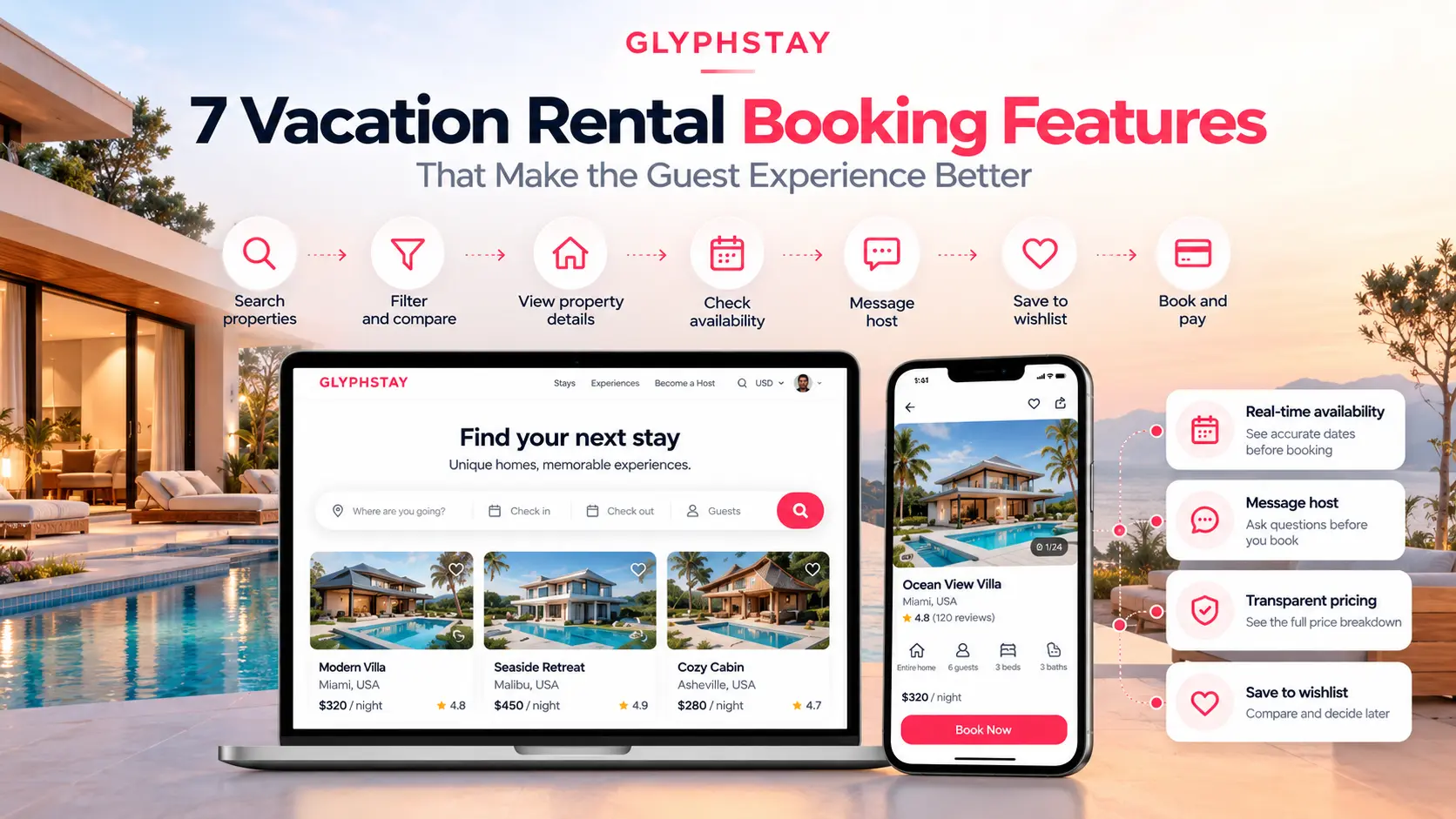
How does the complete booking flow look?
The seven features above should not work like separate parts of the platform.
They should connect with each other.
A guest may start by searching for a location, dates and apply filters.
They open a property and check photos, amenities, reviews, price and availability.
If they have a question, they message the host.
Maybe they save two or three properties before deciding.
Once they find the right one, they either book instantly or send a booking request.
Then comes payment and booking confirmation.
So the actual journey looks something like:
Search → Filter → Property details → Availability → Message or compare → Book → Pay → Confirmation
This is why I would always test the complete booking process instead of checking whether each individual feature exists.
A platform may technically have search, messaging and booking.
But if a guest has to jump between too many screens or repeat the same information several times, the experience is still not good.
If you are planning to buy a readymade vacation rental platform, you will probably receive a long feature list.
Go through it.
But also ask the team to show you how those features work in the actual product.
Try making a booking yourself.
- Search for a property.
- Change the dates.
- Add and remove filters.
- Message the host.
- Check how the final price is shown.
- Try Instant Booking and Request to Book.
- Cancel a test reservation and see what happens.
This will tell you much more than a feature list.
You can also check our guide on Airbnb clone features if you want to look at the broader set of guest, host and admin features required for a vacation rental marketplace.
Takeaway
There is no shortage of features you can add to a vacation rental platform.
But I would start with the ones that make the basic booking process easier.
A guest should be able to find the right property, know whether it is available, understand the price, ask the host a question if needed and complete the booking without confusion.
Once that flow works properly, you can keep adding more features based on your business model and the type of users you are targeting.
Want to see how these features work in an actual platform? Explore our Airbnb clone or contact us to discuss your vacation rental marketplace.